Book-aware writing
Work in chapters and meaningful manuscript parts instead of one endless document. Keep drafting and revision close to the page the reader will encounter, without turning prose into a pile of manual layout codes.
Write or import your manuscript, see the actual typeset pages while you work, and export the print PDF and EPUB retailers need. Cambric runs on Windows and Mac, keeps projects local, and costs $199 once.
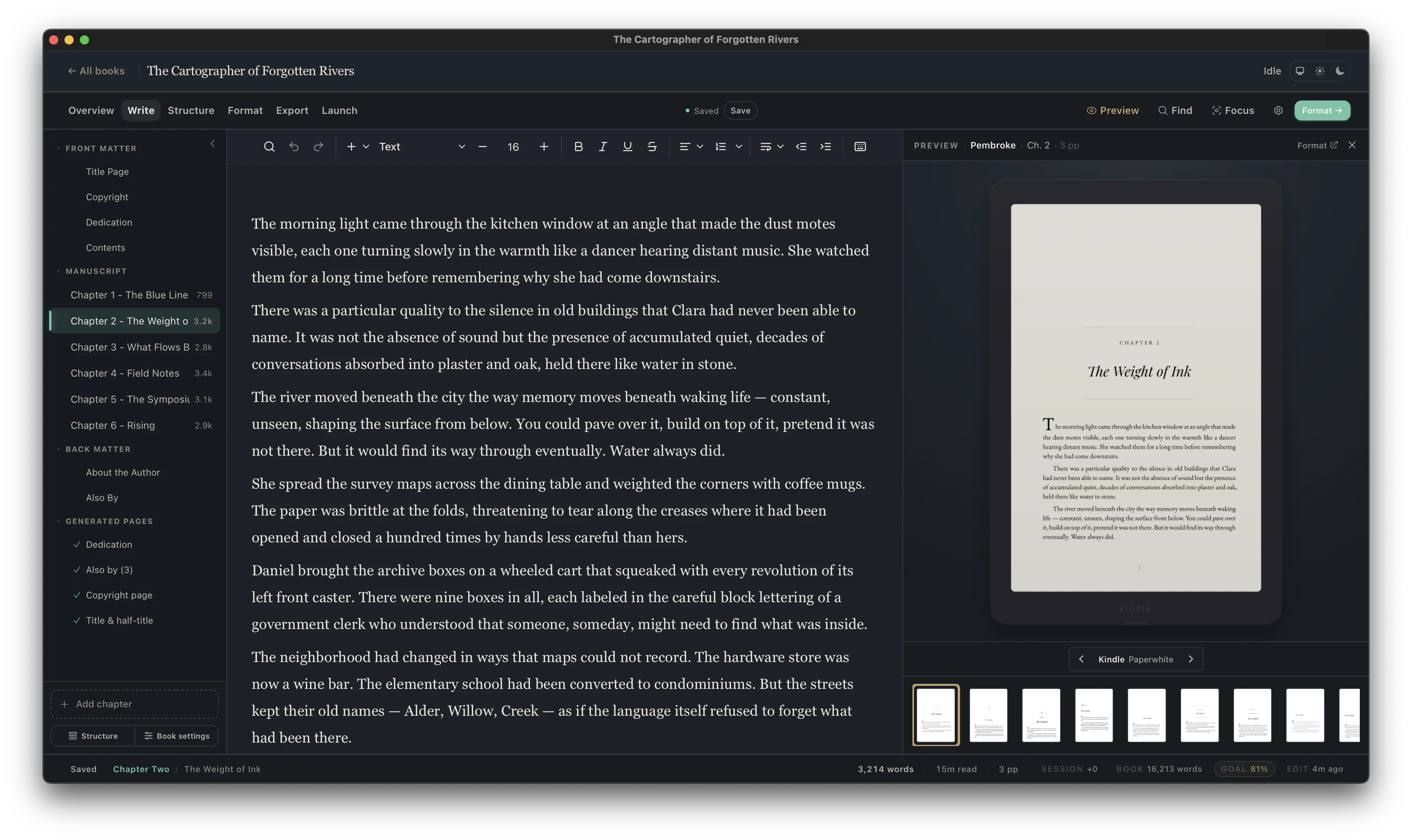
A manuscript is not yet a book interior. Before readers see it, someone has to establish the trim, margins, type hierarchy, chapter system, running matter, page numbering, front and back matter, scene breaks, and dozens of small exception rules. Then the same source has to become both a fixed-layout print file and a reflowable ebook without the two versions drifting apart.
You can hire that work out for every title, fight a general-purpose word processor, or use a browser service that holds the working project. Cambric is the fourth option: a dedicated desktop production app that keeps the manuscript editable, shows you the real pages, and makes the output repeatable. It makes the most economic sense for an author planning more than one release, a series author who needs visual consistency, or anyone who has already spent too many hours repairing PDF and EPUB exports.
Not a single-book conversion and not an export add-on. The license covers the desktop workflow from an editable manuscript to the files you upload.
Work in chapters and meaningful manuscript parts instead of one endless document. Keep drafting and revision close to the page the reader will encounter, without turning prose into a pile of manual layout codes.
Bring in an existing manuscript from Word, Google Docs, or a Scrivener DOCX compile. Import exists to preserve the work you have already done, then move the project into a structure built for books.
Start from a coordinated design system for body type, headings, chapter openings, ornaments, running heads, page numbers, and spacing. A template is a coherent base, not a decorative cover placed over unstable formatting.
See the print page as you work. A long chapter title, a one-line paragraph at the top of a page, or a poorly placed scene break becomes visible before export rather than after a retailer proof arrives.
Produce a fixed interior for print distribution with the trim, margins, page flow, running matter, and typography resolved as pages. Use it for paperback and hardcover workflows at KDP, IngramSpark, and other print platforms.
Create a reflowable ebook from the same structured manuscript instead of maintaining a separate shadow version. The result is suitable for Kindle and wide ebook distribution without treating a print PDF as an ebook source.
Your manuscript project remains on your computer. You can choose your own backup system, keep working without a browser editor, and avoid making access to the book dependent on the continued availability of an online workspace.
Use the same license for the debut, the next release, the rest of a series, and a reformatted backlist. That is where owning the tool becomes materially different from paying a formatter or conversion fee for each title.
There is no professional-services queue and no need to send the manuscript to Cambric. You install the app and run the production workflow on your own machine.
Lemon Squeezy sends the purchase confirmation and license key. Keep that key; it is what unlocks the installers and activates the desktop app.
Use the license-protected download page to get Cambric for 64-bit Windows, Apple Silicon Mac, or Intel Mac. The page recommends the build for the device you are using.
Create a new project or import a DOCX. Check chapter boundaries, front matter, scene breaks, emphasis, and other structural details while everything is still editable.
Select a template, trim size, and book settings. Watch the live pages while you evaluate typography and page flow instead of waiting for a blind conversion.
Create the print PDF and EPUB, inspect the final artifacts, and upload them to the retailers you use. If you spot a content change, return to the same project, revise, and export again.
The simple comparison is not $199 versus free. It is $199 versus the full cost of the workflow you would otherwise repeat.
If this is your only planned book and you are comfortable with a constrained free formatter, the one-time price may not be the right trade. If you expect a second release, want control over revisions, publish both print and ebook, or have paid a formatter before, the calculation changes quickly.
Cambric also changes the cost of small updates. A corrected typo, revised back-matter link, new “also by” list, or series teaser does not require a new vendor handoff. You update the source and export again. That control matters long after launch day.
For freeform illustrated layouts, Adobe InDesign or Affinity Publisher is the more appropriate category. For a fully managed publishing package, hire specialists. Cambric is focused on the interior workflow serious independent authors repeat.
No. Cambric is a $199 one-time purchase. You are not charged every month or every year, and the license is not priced per book.
Yes. Cambric is available as a desktop application for 64-bit Windows and for both Apple Silicon and Intel Macs. The download page automatically recommends the correct installer after you enter your license key.
Cambric exports a fixed-page print PDF for book interiors and an EPUB 3 file for ebooks. Those are the two core interior formats used across print and ebook workflows, subject to each destination’s current requirements and preview process.
Yes. Import a DOCX from Microsoft Word, Google Docs, or a Scrivener compile. Cambric gives the imported manuscript a book-aware chapter structure so you can format and continue editing without starting again.
Cambric is local-first. Your working projects live on your machine rather than inside a browser-only editor. You decide how to back them up and where copies are stored.
Yes. The license is not limited to one title. Cambric is designed for an author’s next release, series, and backlist—not a single export.
No software can honestly guarantee acceptance because requirements change and manuscripts can contain unusual assets. Cambric exports print PDF and EPUB 3 and lets you inspect the composed book before export; you still validate the files and use each destination’s current preview and proof workflow.
Email [email protected] within 30 days of purchase for a full refund. The guarantee exists so you can test Cambric with a real manuscript instead of deciding from marketing copy alone.
Get Cambric for Windows and Mac, use it across unlimited books, and test the complete workflow with a 30-day money-back guarantee.
Continue to secure checkout — $199 One-time purchase · no subscription · PDF + EPUB export · 30-day money-back guarantee