Finish your book with the care it was written with.
Import your manuscript or write from Chapter 1, click a Book Style, see every page settle live on screen, and generate your paperback PDF and ebooks all at once. On your own computer, for $199 once.
- 30-day money-back guarantee
- 1 license · No subscription
- Unlimited books
- 100% local · Zero AI training
Turning your draft into a book shouldn't feel like a second job.
You spend months getting every chapter, every line of dialogue, and every scene break right. Then you sit down to format it for print and Kindle — and your eyes glaze over. One tool wants you to buy a different computer just to open it. Another puts your 90,000-word novel inside a browser tab where typing lags and you're never quite sure your latest chapter saved.
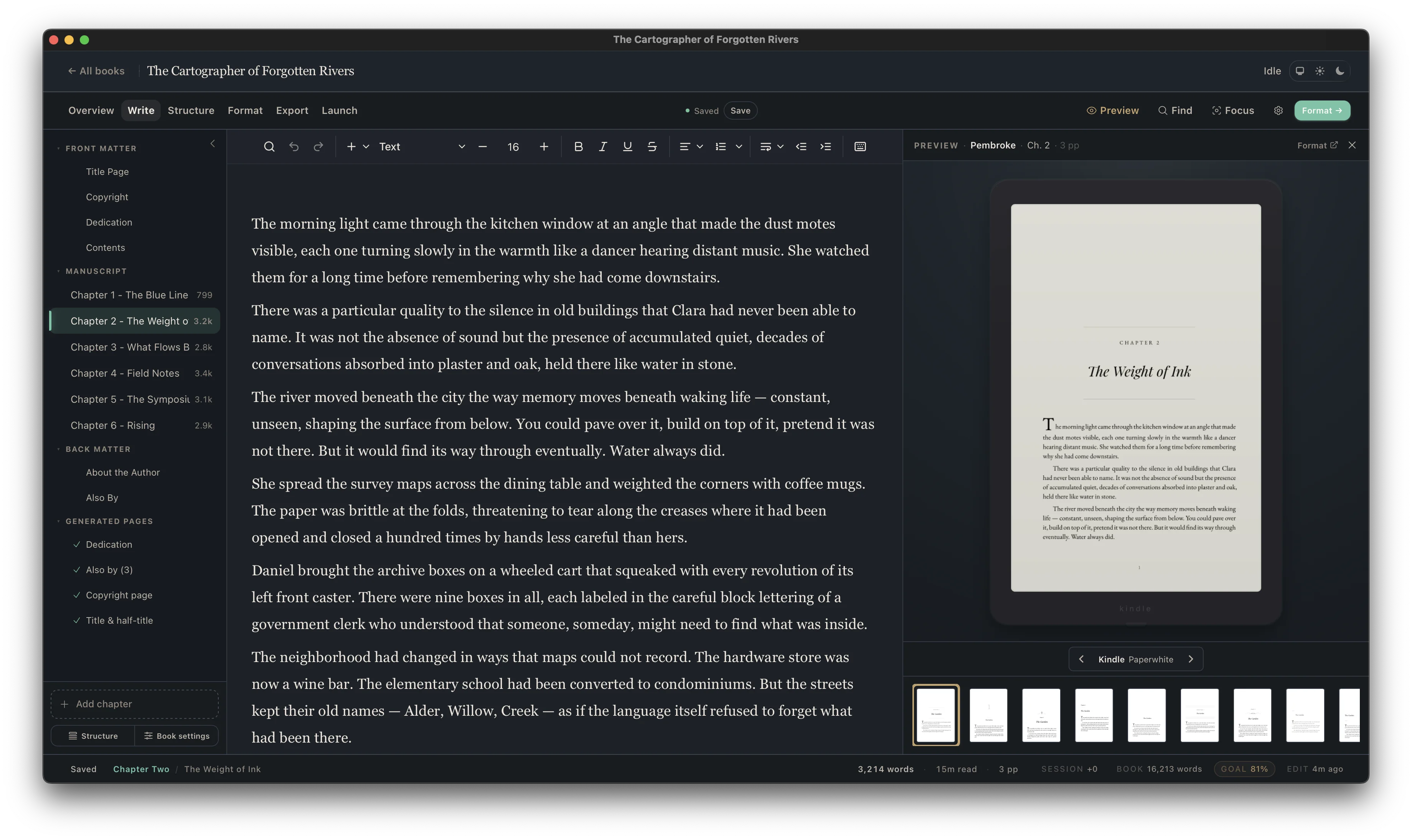
Cambric makes finishing your book feel as calm as writing it. Drop in your Word or Scrivener file on your Windows PC or Mac, pick a Book Style, and watch your actual pages come to life on screen.
Built for the laptop you already own — and the launch deadlines you can’t miss.
You shouldn’t need a $2,500 computer just to type a sentence without lag, or become an unpaid beta tester when a web app pushes a surprise update the night before your KDP preorder locks. Cambric is a native desktop app for Windows and Mac—so even a 500,000-word box set runs smoothly on an everyday laptop.
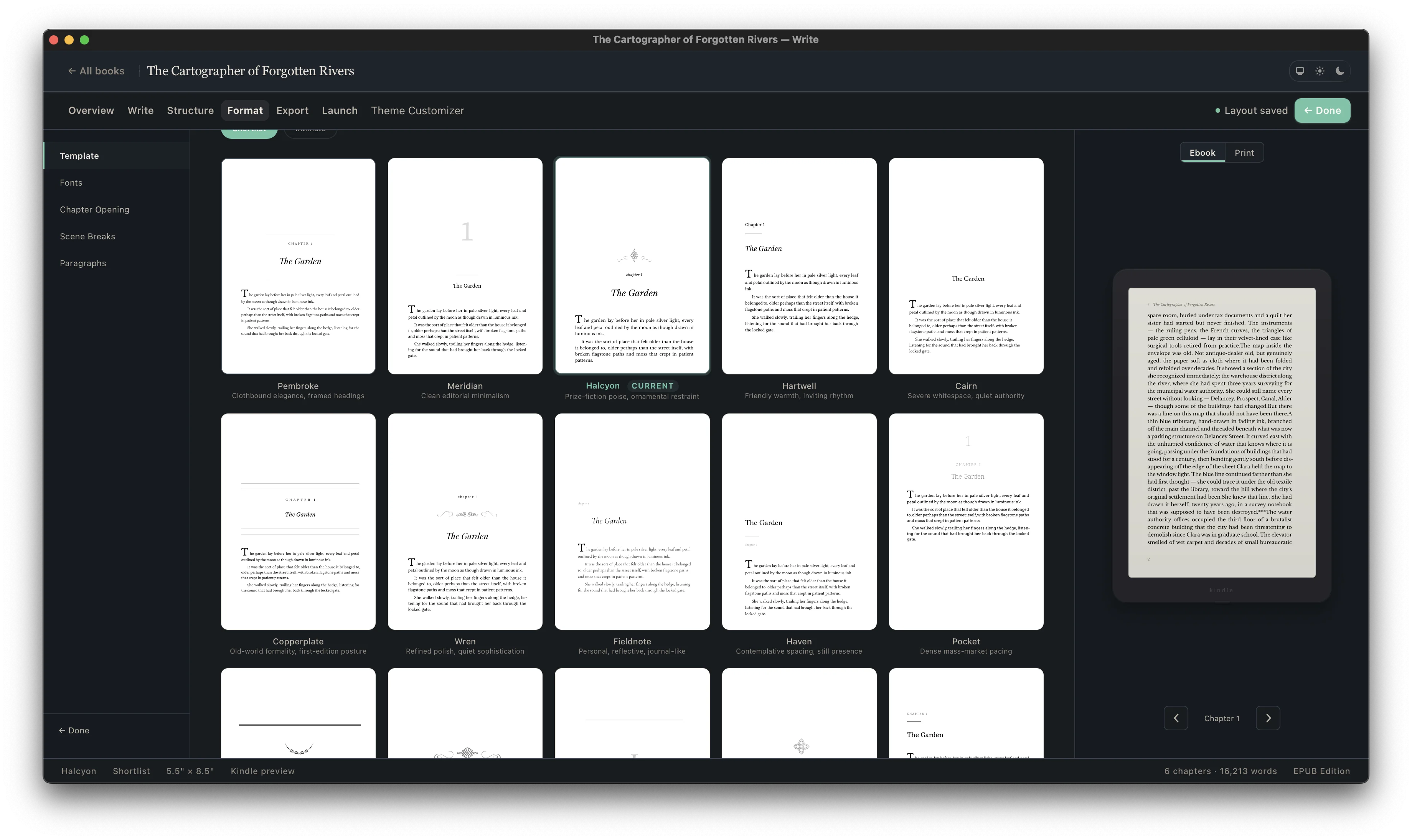
Inspect all 48 included features & technical specifications
- Bold, italic, underline, strikethrough, sub/superscript
- H1–H6 subheadings, ordered & bulleted lists
- Smart quotes, em-dashes & ellipsis cleanup
- Full-book Find & Replace across all chapters
- Unlimited Undo/Redo & distraction-free focus mode
- Live word counts & instant 25k-word chapter switching
- Text-message / chat conversation blocks
- Callout boxes, notes & diary entry blocks
- Block quotes, letters & attributed epigraphs
- Poetry & verse blocks with preserved lineation
- Linked footnotes & endnotes for print and EPUB
- Multi-line drop caps, small caps & dark-mode safe art
- Two-page facing spread preview & spread balancing
- 5×8", 5.25×8", 5.5×8.5", 6×9", Large Print & custom trims
- Automatic KDP & IngramSpark inside gutter scaling
- Custom margins & full-bleed support
- Automatic widow, orphan & runt-line control
- Roman (i, ii) front matter & Arabic (1, 2) Chapter 1 numbering
- Volumes, Parts, Chapters, Front & Back Matter binder
- Drag-and-drop reordering & custom Title Pages
- Print-only or Ebook-only sections from one project
- 500,000+ word / 1,000+ page Box Set & Omnibus builder
- Per-section style overrides for individual chapters
- Reusable series presets across your entire backlist
- One-step .docx import (Word, Scrivener, Google Docs)
- Working round-trip .docx export (chapter or full book)
- Print-ready PDF with embedded fonts & exact trim/bleed boxes
- Validated EPUB 3 (Dual-POV safe for Apple & Google Play)
- Built-in preflight checks for margins, image DPI & fonts
- Light & dark e-reader preview + accessibility presets
- Native 64-bit Windows 10/11 & macOS (Apple Silicon/Intel)
- Runs lean on everyday 8GB laptops—no memory crashes
- Local desktop workspace + automatic local backups
- Portable verified Cambric backups for off-device recovery
- Zero cloud uploads, zero AI training, zero data mining
- You control updates—never forced on launch night
Browser-Based Formatters vs. Cambric Desktop App
Pays for itself on your very first book.
Hiring a freelance formatter typically runs $150 to $350 for a single novel — plus another $35 to $75 every time a reader emails you about a typo or you need to add a new sequel to your Also By page.
Worse, one 1-star Amazon review complaining about broken headers, missing scene breaks, or glowing white boxes in Kindle dark mode stays on your book page forever and quietly kills your ad conversion rate.
With Cambric, you pay $199 once and own the desktop studio for every book, box set, and backlist update you ever publish.
Why authors are moving their backlists to Cambric
“I write on a five-year-old Windows laptop and was dreading formatting my paperback. Imported my 88k-word Word doc, picked a style, and had my KDP print PDF and EPUB done before dinner.”
“KDP Print Previewer accepted the PDF on the first upload—no margin warnings, no font errors. That has literally never happened to me when exporting from Word.”
“Paid a formatter $180 for Book 1 and then had to pay her another $35 just to fix two typos and add my Book 2 link in the backmatter. Did Book 2 myself in Cambric and it honestly looks cleaner.”
“Runs natively on Windows without lag. My last formatter was browser-based and started freezing every time my draft passed 80,000 words. Takes a minute to get used to the binder sidebar, but it’s rock solid.”
“My dual-POV romance kept getting bounced by Apple Books because of repeating chapter names. Re-exported the EPUB from Cambric and it went straight through Apple and Kobo with zero warnings.”
“Got my 5.5 × 8.5 proof copy from Amazon yesterday. The inside gutter, running headers, and drop caps look like a real bookstore paperback.”
“What sold me is that my manuscript stays on my own hard drive. I write on the train with no Wi-Fi and never have to worry about a browser tab losing my chapter.”
“Word import kept all my italics, scene breaks, and chapter titles intact. I was braced for two hours of cleanup and didn’t have to fix a single chapter break.”
“115,000-word fantasy novel with a prologue, epigraphs, and three backmatter pages. Everything lined up on the right pages automatically.”
“Line breaks in poetry usually get mangled when switching between print and EPUB. Being able to see the actual page while adjusting stanza spacing saved me days.”
“Bundled my 3-book trilogy into a 310,000-word omnibus. My old browser tool crashed twice trying to open it; Cambric generated the PDF and EPUB in about two seconds.”
“Scene breaks and drop caps are one click, and the ornamental dividers don’t show up with weird white boxes behind them in Kindle dark mode.”
“Spotted a typo on page 42 the night before my preorder locked. Opened the project, fixed the word, and had a new print PDF and EPUB uploaded in three minutes.”
“I’m not technical at all. Watched Word mess up my page numbers for a week, bought Cambric on a Saturday morning, and had my paperback uploaded that afternoon.”
“Was renting MacInCloud by the hour just to format my books on a Windows PC, which was laggy and annoying every time I needed a quick backmatter edit. So glad to have a native Windows app.”
“Moved my first three mystery novels over in a weekend so the chapter headers and Also By pages finally match across the series. IngramSpark accepted all three PDFs on the first try.”
“Having Roman numerals on the front matter and page 1 starting cleanly on Chapter One without fighting Word section breaks is worth the price by itself.”
“Text-message threads and stat tables in my novel didn’t mess up the paragraph styling after them. First formatter I’ve used on Windows that didn’t fight me on callout boxes.”
“Changed my trim size from 6 × 9 to 5.5 × 8.5 to see how much it would change my KDP print cost. Took literally two seconds to re-paginate the whole book.”
“Lost half a chapter last year when a web-based formatter said ‘Saved’ while my Wi-Fi dropped. Never going back to cloud sync for my manuscripts.”
“My proofreader still works in Word, so being able to export a clean .docx back out of Cambric without breaking anything saved my launch schedule.”
“Didn’t have to buy a used Mac mini just to make my paperbacks look like real books. That alone saved me $500.”
“The widow and orphan control actually works without leaving weird two-inch gaps at the bottom of the page.”
“Compiled out of Scrivener into .docx, dropped it into Cambric, and had my print PDF and EPUB ready in twenty minutes. Zero Compile headaches.”
Everything you need to know
Is Cambric a subscription?
No. Cambric is a $199 one-time purchase. There are no monthly fees, no annual renewals, and no per-book export charges.
Does it run on both Windows and Mac?
Yes. Cambric is a native desktop application for 64-bit Windows and macOS. After checkout, the download page highlights the installer for your machine.
What files does Cambric generate?
Cambric generates a print-ready PDF (for Amazon KDP and IngramSpark paperbacks and hardcovers), a validated reflowable EPUB 3 (for Kindle, Apple Books, Kobo, Google Play, and wide stores), and a clean editable DOCX whenever your editor needs a Word file.
Can I import a manuscript I already wrote in Word or Scrivener?
Yes. Drop in your DOCX from Microsoft Word, Google Docs, or Scrivener. Cambric builds your chapters, Title Page, and Table of Contents automatically so you can pick a Book Style and preview your pages right away.
Where are my books stored?
On your own computer. Cambric is a local desktop app with continuous autosave, automatic local backups, and portable verified Cambric backups — your manuscripts never sit in a browser cloud account.
How many books can I create with one license?
Unlimited. Use Cambric for your debut novel, your next ten series releases, multi-book box sets, large-print editions, and every backlist update.
What if Cambric isn’t right for my book?
Every purchase is backed by a 30-day money-back guarantee. Test Cambric on your actual manuscript — if it isn’t the right fit, email [email protected] within 30 days for a full refund.
Try Cambric on your own manuscript today.
Import your real manuscript, preview your pages, and export your print PDF and EPUB 3. If Cambric isn’t the right fit within 30 days, email [email protected] for a full refund.